


Daily Archives: July 25, 2026
HUD Displays for Cars: Best Options for Heads-Up Navigation
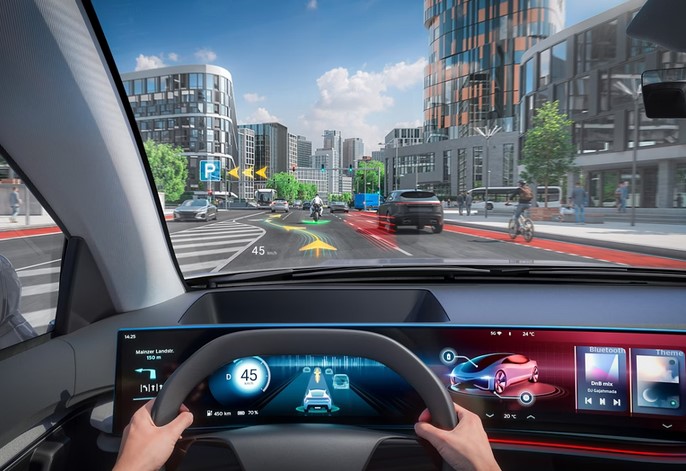
Source:https://aumovio.scene7.com
It takes exactly one second at 60 mph to travel 88 feet completely blind. That is the precise distance your car covers while your eyes drop down to check a text message, look at a turn-by-turn map on your center console, or glance at your speedometer. In the real world, that one second is the difference between a smooth commute and a catastrophic highway collision.
During my decade-plus spent testing automotive electronics and modifying track cars, I have driven vehicles equipped with everything from basic analog needles to hyper-advanced digital cockpits. I can tell you firsthand that looking away from the blacktop is the ultimate enemy of situational awareness. That is exactly why HUD displays cars have evolved from expensive military fighter jet technology into the single best aftermarket safety upgrade you can buy today.
If you want to keep your eyes locked on the horizon while still tracking your speed, engine vitals, and navigation routes, you need an optimal heads-up solution. Let’s dive deep into how these devices work, what to look for, and the best options to upgrade your drive.
The Technology Explained: How a HUD Projects Your Data
To understand why a good heads-up display is so effective, we have to look at the optics. Many beginners assume that a HUD is simply a tiny screen reflecting off glass. If it were that simple, your eyes would constantly struggle to adjust their focus between the distant road ahead and the nearby windshield surface, causing massive eye strain.
Think of a quality HUD like a movie theater projector rather than a smartphone screen.
-
The device sits on your dashboard and uses an ultra-bright LED or TFT light source.
-
It shoots that light through a series of curved mirrors.
-
This creates a virtual image that appears to float roughly 5 to 7 feet out past your front bumper.
Because the data is optically projected into the distance, your eyes do not need to refocus when you switch between looking at the traffic ahead and reading your speed. It blends seamlessly into your natural field of view.
The Main Types of Aftermarket HUD Displays
When shopping for HUD displays cars owners typically have to choose between two main hardware styles and two distinct data sources.
1. Windshield vs. Combiner Systems
-
Windshield HUDs: These project data directly onto your car’s front windshield glass. They look incredibly clean and integrated, but they often require a small piece of reflective tint film applied to the glass to eliminate “ghosting” (a double-image effect caused by the dual layers of a standard laminated windshield).
-
Combiner HUDs: These units come equipped with their own integrated, flip-up plastic screen (the combiner). While they look a bit more bolted-on, they guarantee a crystal-clear, razor-sharp image in all lighting conditions without modifying your windshield.
2. OBD2 vs. GPS Data Sourcing
-
OBD2 Connected HUDs: These plug directly into your car’s On-Board Diagnostics (OBD2) port located under the dashboard. They pull real-time, highly accurate data directly from your engine computer, tracking metrics like exact engine RPM, coolant temperature, system voltage, and fuel consumption.
-
GPS Standalone HUDs: These units rely entirely on a built-in GPS antenna. They only require basic power from a USB port or cigarette lighter socket, making them universally compatible with any vehicle—even classic cars. They track speed and compass direction based on satellite signals, though they can lose connection briefly in tunnels or deep urban canyons.
HUD Data Source Selection:
[Need Turn-by-Turn & Global Speed?] ➔ Choose GPS/Bluetooth App-Synced
[Need Engine Health & RPM Metrics?] ➔ Choose Hardwired OBD2 Connection
The Best Aftermarket HUD Options for Heads-Up Navigation
If you want to upgrade your cockpit without buying a luxury vehicle, these top-tier aftermarket systems deliver incredible performance.
1. Hudly Wireless: The Smartphone Mirroring Powerhouse
If your primary goal is navigation, the Hudly Wireless is an outstanding mid-to-high-tier option. Instead of just displaying numbers, it functions as a transparent secondary monitor for your smartphone.
-
Why it excels at navigation: It casts your phone screen wirelessly via Wi-Fi casting. This means you can display full color layouts from Google Maps, Waze, or Apple Maps directly in your line of sight.
-
Optics: It utilizes a clear combiner glass screen that automatically adjusts its brightness based on ambient sunlight, ensuring you can read small street names even in direct midday sun.
2. Pyle Universal HUD (PHUD180BD): The Reliable Everyday Commuter
For drivers who want a clean, simple layout focused on vital driving data rather than full map graphics, Pyle offers an exceptionally reliable OBD2/GPS dual-mode system.
-
The Technical Edge: It plugs into your OBD2 port for instantaneous speed and tachometer readouts, but switches to GPS if it detects an older protocol. It features a multi-color display that projects cleanly onto the windshield, giving you warning alarms if your engine temperature spikes or if you cross a pre-set speed limit.
3. Acecar T800: The Beginner-Friendly Budget Champ
If you want to try out heads-up technology without spending a fortune, the Acecar T800 is a highly popular, compact combiner-style unit.
-
The Practical Advantage: Because it features its own fold-up screen, installation takes less than two minutes. It pulls data via a stable GPS connection, providing large, easy-to-read speed readouts, travel time, and driving distance. It is the perfect low-profile option for older daily drivers or rental cars.
Comparing the Top Aftermarket HUD Displays
To help you choose the right interface for your dashboard layout, let’s look at how the top performers match up:
| HUD Model | Display Style | Primary Data Source | Best Feature | Ideal Reader Profile |
| Hudly Wireless | Combiner Screen | Smartphone Screen Mirroring | Full color Waze/Google Maps projection | Intermediates wanting advanced mapping |
| Pyle PHUD180BD | Windshield Projector | OBD2 Port + GPS Dual Mode | Engine health monitoring & multi-color UI | Drivers tracking diagnostics and speed |
| Acecar T800 | Combiner Screen | GPS Satellites | Rapid, universal 2-minute installation | Beginners looking for a basic speed readout |
| Scosche HUD2 | Windshield Projector | OBD2 Port | Compact profile with auto-dimming | Commuters wanting minimalist alerts |
💡 Pro Expert Advice: The Polarized Sunglasses Trap
Here is a critical piece of advice that you will rarely find in user manuals: HUDs projecting directly onto the windshield are nearly invisible if you wear polarized sunglasses.
Polarized lenses are specifically designed to block horizontal light reflections to eliminate road glare. Because a windshield HUD relies entirely on reflecting light off the glass surface, your high-end sunglasses will treat the HUD image as unwanted glare and filter it out entirely. If you are a dedicated daytime driver who refuses to part with polarized sunglasses, you must choose a Combiner-style HUD with its own dedicated plastic screen, as their specific light angles bypass this filtering effect.
Final Thoughts: Keep Your Focus Forward
Upgrading your vehicle with one of the best modern HUD displays cars accept aftermarket is a massive step forward in driving ergonomics. By moving your critical mapping layout and speed data off your center stack and directly into your forward line of sight, you eliminate unnecessary eye wandering and significantly cut down your reaction times.
Whether you want a high-tech smartphone mirroring display to navigate complex city intersections or a simple OBD2 monitor to protect your engine, there is a heads-up option tailored for your dashboard.
Are you looking to install a clean windshield projection system, or do you prefer the plug-and-play simplicity of a built-in combiner screen? Let me know your vehicle model and your main navigation challenges in the comments below, and let’s get your cockpit configured!